
Enhance Your Search with AI-Powered Answers
Overview
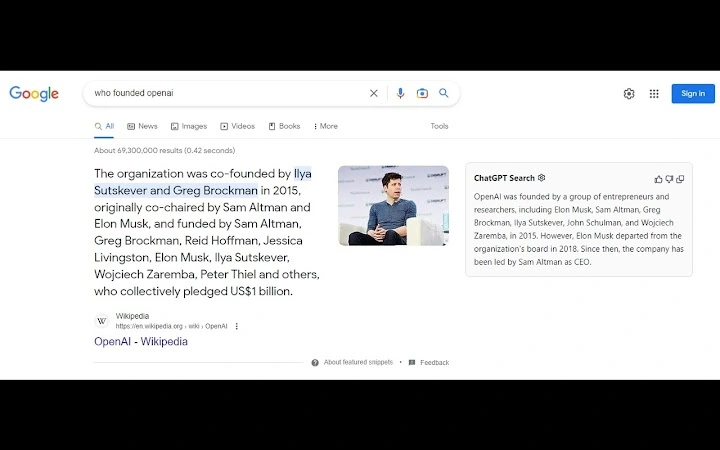
The ChatGPT for Google browser extension is designed to elevate the standard search experience by integrating OpenAI’s advanced language model directly into popular search engines. By combining traditional search results with AI-generated responses, users gain access to more contextual, human-like answers. This tool is particularly useful for professionals, researchers, students, and general users seeking faster, more accurate information retrieval. The extension enables seamless interaction with ChatGPT while browsing, allowing users to ask follow-up questions, clarify queries, and receive detailed explanations without leaving their current page.
Real-world applications include summarizing complex articles, drafting emails, solving technical problems, and generating ideas on demand. The extension supports Google, Bing, and DuckDuckGo, making it adaptable for users who switch between search platforms. It also includes a helper function that allows ChatGPT access on any website, broadening its utility beyond search engines. The developer, ChatGPT for Google, has positioned this tool as a productivity enhancer for digital workflows.
The developer did not provide additional system requirements. Performance observations are based on general software behavior patterns. No specific user statistics or ratings were included in the release materials.
Key Features & Capabilities
- AI-Powered Search Integration – Combines standard search engine results with real-time ChatGPT responses, offering both factual data and natural language explanations.
- Multi-Engine Support – Works with Google, Bing, and DuckDuckGo, enabling consistent AI assistance across different search platforms.
- ChatGPT Helper Function – Allows users to activate ChatGPT on any website, facilitating instant access to AI assistance during web browsing.
- Conversational Interface – Users can interact with ChatGPT in a natural, back-and-forth manner, refining queries and receiving context-aware responses.
- Custom Trigger Mode – Enables users to define personalized activation triggers for the extension, improving workflow efficiency.
- Response Copying – Offers the ability to copy AI-generated answers directly to the clipboard for easy reuse in documents, emails, or notes.
- Feedback Submission – Users can submit feedback to help improve the AI model’s performance and accuracy over time.
- Bug Reporting – Issues can be reported through the extension’s review section, supporting ongoing development and reliability.
These features streamline research, content creation, and problem-solving tasks. For example, a student researching climate change can use the extension to generate summaries, compare viewpoints, and draft sections of a paper—all without switching tabs. Similarly, a professional can clarify technical documentation or brainstorm project ideas directly from search results.
User Interface, Workflow & Performance
The extension features a minimal, unobtrusive interface that integrates smoothly with browser layouts. The main control panel appears as a small icon in the browser toolbar, which expands into a compact chat window when activated. Navigation is intuitive: clicking the icon opens the ChatGPT interface, where users can type queries or use the custom trigger mode.
Workflow efficiency is enhanced by the ability to keep the chat window open while browsing, allowing for continuous interaction without interrupting the user’s focus. The extension does not require constant re-authentication, as it leverages an existing session from chat.openai.com. However, the developer did not specify resource usage details. Performance observations are based on general software behavior patterns.
Stability appears consistent with typical browser extensions, though users are advised to avoid running multiple ChatGPT-related extensions simultaneously, as this may cause conflicts. The extension does not appear to significantly impact CPU or RAM usage based on available data, but exact performance metrics were not provided.
Compatibility & System Requirements
ChatGPT for Google is compatible with Windows, Mac, and Linux operating systems. It is designed for modern web browsers that support extensions, including Chrome, Firefox, and Edge. The installation size is 3.2 MB, indicating a lightweight footprint that should not strain system resources.
Exact system requirements were not listed. The developer did not specify minimum hardware specifications or browser versions. Compatibility information is limited to the supported platforms and extension-based deployment. No additional dependencies were mentioned.
Pros and Cons
Pros
- Seamless integration with major search engines: Google, Bing, and DuckDuckGo
- AI-powered responses enhance search accuracy and depth
- Helper function enables ChatGPT use on any website
- Minimal interface with low visual clutter
- Supports custom triggers and clipboard copying
- Free to use with no subscription required
- Encourages user feedback for continuous improvement
Cons
- Only works with browsers that support extensions
- Cannot be used alongside other ChatGPT extensions
- No detailed system requirements provided
- Performance impact on low-end devices not documented
- Relies on external OpenAI account and internet connection
FAQ Section
Is ChatGPT for Google compatible with all browsers?
The extension is designed for browsers that support extensions, including Chrome, Firefox, and Edge. Compatibility with other browsers is not confirmed.
Is the extension secure to use?
As a browser extension, it requires access to browsing data. Users should review permissions before installation. The developer does not provide detailed security documentation.
How often does the extension receive updates?
Update frequency is not specified. Users are encouraged to check the extension page for the latest version.
What license type does the extension use?
The extension is free to use and does not require a paid license. No formal license terms were included in the release materials.
Can I use this extension offline?
No, the extension requires an active internet connection to communicate with OpenAI’s servers. Offline functionality is not supported.
Final Thoughts + CTA
ChatGPT for Google delivers a compelling upgrade to everyday search workflows by merging AI intelligence with traditional search results. Its ability to function across multiple search engines and websites makes it a versatile tool for anyone seeking faster, smarter information retrieval. The clean interface, responsive design, and free access further enhance its appeal.
While system requirements and performance data are limited, the extension’s lightweight size and seamless integration suggest broad accessibility. It is ideal for students, researchers, writers, and professionals who rely on timely, accurate information.
Download ChatGPT for Google now to transform your search experience with AI-powered insights.







